Send Money to Lorena Walkthrough: How to Pay Lorena
A phone-only Chapter 3 errand: send $5,000 to Lorena through BuckMe. The catch is that the money must be in Checking, not in your pocket or Family Savings.
In this guide
Send Money to Lorena is a short Chapter 3 story task with nothing to drive to or fight. You open the BuckMe app on your phone and pay Lorena $5,000. What trips people up is the source of the money: it has to be in your BuckMe Checking account. Cash in your pocket and Family Savings don't count.
Quick facts
| Mission | #51 in story order, Chapter 3 |
| Type | Mandatory story task |
| You play | Lucia (the payment can be made from the phone either way) |
| Triggered by | Lorena's call and Lucia's follow-up text after Mami Knows Best |
| Starts at | Anywhere. There is no map marker |
| Before you start | Finish Mami Knows Best and have $5,000 in Checking |
| Reward | None. It costs you $5,000 |
| Counts for 100% | Yes |
All objectives
- Finish Mami Knows Best. Afterward Lucia talks to her aunt Lorena, whose husband has lost his job. Lorena says they're fine, and Lucia texts that they should send money anyway. A "Map updated" notice shows the task has been added.
- Check the Story list. Open the pause map and look under Story. The entry reads $0 / $5,000 and has an Open BuckMe shortcut (Triangle). You don't need to set a waypoint.
- Make sure Checking holds $5,000. If your cash is in your pocket, deposit it at an ATM first. Family Savings can't be used.
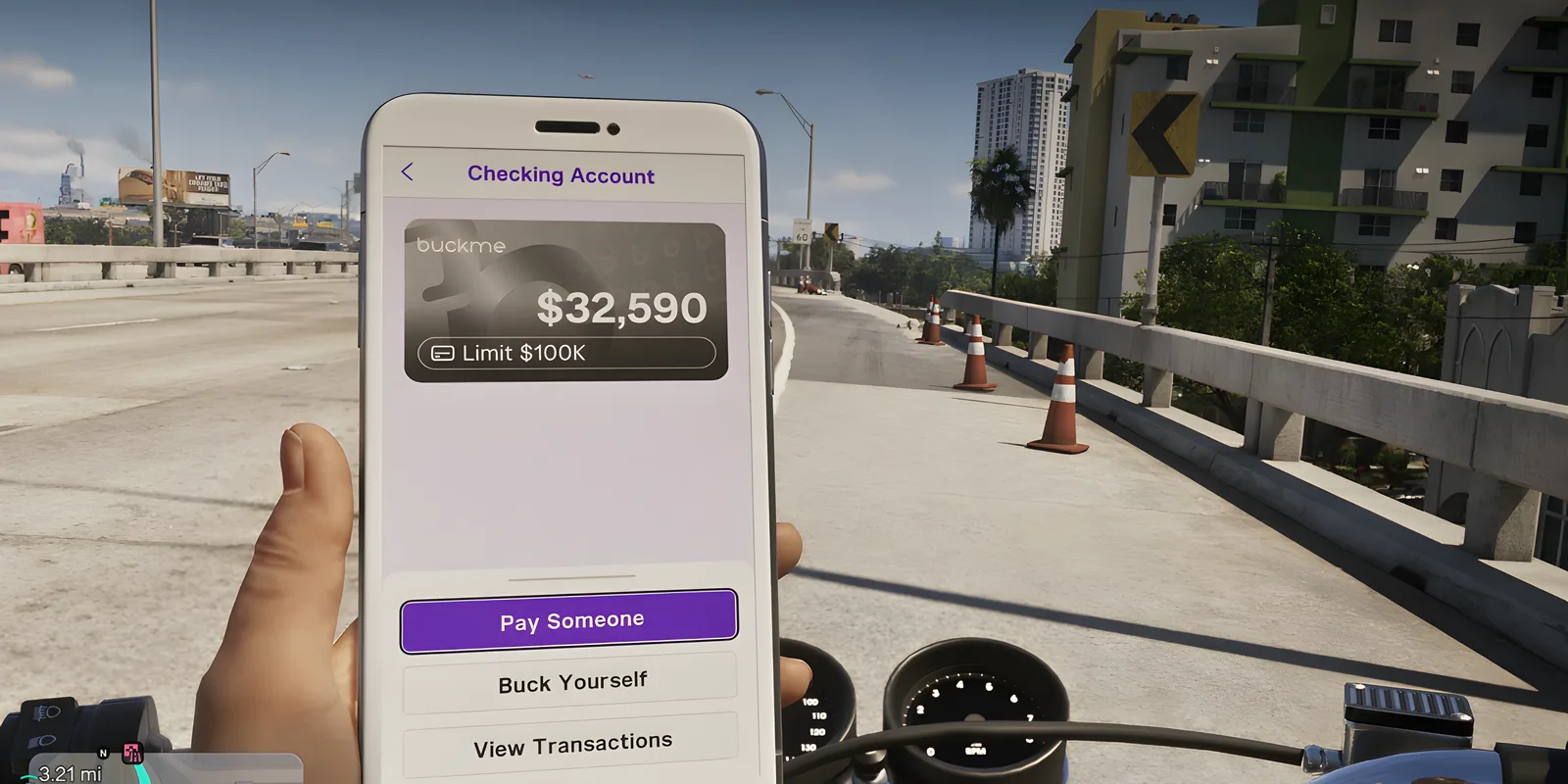
- Open BuckMe. It's the purple app on your phone. You can do this on foot, in a car or on a bike.
- Pick Checking Account, then Pay Someone. Don't choose a deposit or a transfer to savings.
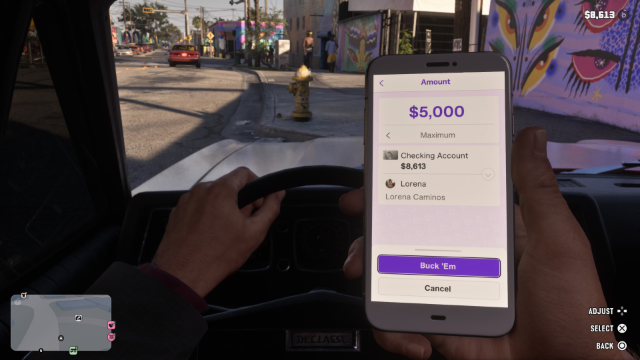
- Select Lorena. She is listed as the suggested contact, with $5,000 already filled in (her full name is Lorena Caminos).
- Confirm with Buck 'Em. The transaction screen shows -$5,000 to Lorena and the task completes straight away. There is no handoff afterward.
Choices
There are none. The call has no dialogue options and the amount is fixed.
Missables
Nothing is lost permanently. The task stays in your Story list until you pay it, and it has no timer.
If it doesn't trigger or won't pay
- No entry in Story: finish Mami Knows Best and keep playing as Lucia. Check the Story list on the pause map, not the world map.
- Task shows but stays at $0 / $5,000: you probably paid from the wrong place. Use Checking Account > Pay Someone > Lorena, not a transfer between your own accounts.
- Payment won't go through: Checking is short. Bank your cash at an ATM or wait for a job payout.
- Lorena never calls: install the latest update, make a manual save, quit fully and reload.
What comes next
A few in-game days later Lorena sends photos of Tommy. A second task, Send More Money to Lorena, then appears and costs another $5,000, so the two payments total $10,000. Pay it the same way. Later in Chapter 3 Lorena calls Lucia to say the bank has noticed the transfers, and that closes the thread. Keep $5,000 in Checking for the second request.
Quick answers
How much money do you send to Lorena in GTA 6?
$5,000 from your BuckMe Checking account. A second, separate task called Send More Money to Lorena costs another $5,000.
Is there a reward for Send Money to Lorena?
No. The mission pays nothing and just takes $5,000 out of your account.
How do you unlock Send Money to Lorena?
Finish Mami Knows Best in Chapter 3. Lorena's call and Lucia's text then add the task to your Story list.
Can I use cash or Family Savings?
No. The payment must come from Checking, so deposit pocket cash at an ATM first.
Sources
- Community wiki Send Money to Lorena GTABase
- Community wiki GTA 6 Send Money to Lorena Walkthrough GTABoom
- Community wiki GTA 6 Send Money to Lorena Walkthrough (BuckMe) GTA6Heists
- Community wiki GTA 6 Send Money to Lorena: Both BuckMe Payments Tech4Gamers
- Community wiki Send Money to Lorena: Both $5,000 BuckMe Payments Clutchbase
- Community wiki Send Money to Lorena Mission Walkthrough games.gg
- Community wiki GTA 6 walkthrough: All missions Etalon
This guide was researched and drafted with AI assistance, then checked against the sources listed above. See our editorial policy. Spotted a mistake? Tell us and we will fix it.
More GTA 6 guides
- Gone Fishing Walkthrough: All Objectives and the Cash Trailer Walkthrough
- Lab Fees Walkthrough: All Objectives and Door Codes Walkthrough
- Hey Arnold! Walkthrough: All Objectives and Kill or Spare Arnold Walkthrough
- Steal the Scooter Walkthrough: All Objectives and When It's Missable Walkthrough
- Gear Up Walkthrough: All Objectives and the Kingfishers Ambush Walkthrough